Blog

  • The Psychology of Inbox Zero (and How Aliases Support It)

    The Psychology of Inbox Zero (and How Aliases Support It)

    There is just a level of peace from seeing a clean inbox, which is what the psychology of inbox zero is all about.

    If you ever opened your inbox, spotted hundreds of unread emails, and just thought, “Yeah… I’m not dealing with that right now”, you know what we mean. 

    Consider that the average office worker gets 40 emails a day. A truly intense amount, to say the least. That little red bubble feels like it’s yelling at you before you’ve even had your first sip of coffee.

    Here’s the truth. It’s not just that you have a messy inbox ahead of you. It’s all about the extra weight sitting in your head. And it’s exhausting

    Fortunately, the fix here are the famous email aliases. And that’s because they quietly clear out the junk… which is pretty useful!

    So, if your inbox is starting to feel more like a war zone than a useful tool, maybe it’s time to see how tidying it up can give your head some breathing room.


    Table of Contents

    1. Why Inbox Zero Feels So Good (Backed by Science)
    2. Cognitive Benefits: Clearing Out the Mental Clutter
    3. Stress Reduction: The Emotional Weight of Email Overload
    4. Dopamine and Progress – Why “Zero” Feels Rewarding
    5. Control and Compartmentalization: The Psychology of Feeling in Charge
    6. Privacy and Perception: Why Aliases Create Psychological Safety
    7. Fire-and-Forget: The Mental Model That Makes Life Easier
    8. Why Alias Email Is the Smart Upgrade for Inbox Peace of Mind
    9. Your Inbox Doesn’t Have to Rule Your Mind

    Why Inbox Zero Feels So Good (Backed by Science)

    That little wave of relief when you see “No new messages”? Well, that feeling is not just in your head, it has psychology behind. In this particular case, the Zeigarnik Effect explains it perfectly. This effect has to do with unfinished tasks linger in your mind, quietly stealing attention until you deal with them. 

    Every unread email is basically just mental clutter tapping you on the shoulder, reminding you it’s still there. 

    All day. Every day.

    And clutter, even the digital kind, messes with how well you can focus and make decisions. That’s where the idea of inbox zero comes in! Clearing out the noise lowers your mental load and frees up brain space so you can actually think about what matters. Or as productivity expert David Allen likes to put it, “Your mind is for having ideas, not for holding them.”

    When your inbox is clear, your head feels clear, too.

    Cognitive Benefits: Clearing Out the Mental Clutter

    Let’s be honest, a messy inbox is like a messy room. You can live with it, but it’s not exactly helping your mood. When all your emails end up in the same disorganized pile, your brain has to waste energy sorting through them just to figure out what’s important. After a while, it’s straight-up tiring.

    The fix? Start clearing out that digital junk drawer. Using something as simple as email aliases means your messages are already sorted before you even look at them. No more opening your inbox and playing “Is this important or can it wait?” forty (or more) times a day. You’ll have more mental space and less stress. That’s also way more energy left over for the good stuff!

    Fewer decisions = more mental energy

    Every email is a tiny decision waiting to happen, open now, save for later, delete? Do that enough times and you hit decision fatigue, which is basically your brain saying, “I’m done for today.”

    Aliases make it way easier. They can pre-sort your messages so you’re not mixing shopping deals with client updates. Think of it like having someone hand you only the stuff you actually need, instead of dumping the whole mailbag on your desk. Less deciding, more doing.

    A faster mental triage

    With an alias, everything is way easier to sort out. To make it work, you can set up addresses like you+clients@gmail.com, you+shopping@gmail.com… Creating an alias with Gmail is not difficult at all. You can do it in seconds, and for everything you need.

    Related Article

    That way, when you open your inbox, you already know what’s waiting for you. Client stuff? Cool, dive in. Shopping receipts? They can be there for later.

    Stress Reduction: The Emotional Weight of Email Overload

    Stress from seeing your +40 messages (or even more!) per day starts before you even open the first one. That unread count is like a big neon sign yelling that you’re already behind, and your body instantly tenses up. It’s the same kind of mental weight you feel with any half-done task, your brain keeps poking you about it and pulling your focus away from everything else.

    By using a tool like Alias Email, you can change that first impression. Because it filters incoming messages into clear categories and it stops you from facing the entire pile at once. Your brain sees smaller, contained groups of emails and not one overwhelming flood, which instantly makes the inbox feel lighter and more manageable. 

    This is the psychology of inbox zero at play, which means more peace of mind.

    Dopamine and Progress – Why “Zero” Feels Rewarding

    Getting to inbox zero feels way better than you might expect, and it is not just in your head. Your brain is wired to enjoy finishing things, and every time you do, it gives you a small hit of dopamine. That “all clear” moment is more than a clean screen; it is your brain celebrating. It is the same reason crossing something off a list or closing the last browser tab feels so satisfying.

    Inbox zero turns your inbox into a series of small wins. Every message you clear is another mental checkmark in your “done” column, and the more you do it, the more you want to keep going. With the right setup, you can hit those feel-good moments much more often.

    Completion = chemical satisfaction

    You know that small rush when you mark something as done? That is your brain’s reward system kicking in. Even tiny actions like archiving an email can trigger that dopamine boost. It is not so much about the size of the task, but the closing the loop.

    Inbox zero is simply a chain of those mini finish lines. Clear a few messages, get the reward, and repeat. Before long, you are on a roll and email management actually feels pretty satisfying.

    Aliases as momentum tools

    Instead of handing out your main email to every shop, form, or random sign-up, you slip in a buffer. 

    That little layer of protection simply cuts down the spam, keeps phishing attempts out, and saves you from random interruptions you don’t really want.

    Create alias in seconds

    Start protecting your inbox now — it’s free!

    Create my first alias

    Control and Compartmentalization: The Psychology of Feeling in Charge

    When your inbox is a mess, it is easy to feel like you are never on top of it. That constant flood of random emails can lead to something psychologists call learned helplessness. You start believing no matter what you do, the chaos will win. 

    On the flip side, a well-organized inbox gives you a sense of control. In psychology, that is called an internal locus of control, and it is basically the belief that you are running the show. You feel that solutions and getting things done are on you.

    How aliases help you compartmentalize

    Think of aliases as digital drawers. Instead of letting everything land in one giant heap, you give each type of email its own corner. Shipping updates go in one place, client messages stay in another, and newsletters hang out on the side until you actually feel like reading them. 

    This separation does more than make things look tidy. It stops emotional spillover, no more work drama sitting right next to a birthday coupon from your favorite store. That means you can switch contexts without dragging unrelated feelings into the next task.

    Privacy and Perception: Why Aliases Create Psychological Safety

    Part of feeling safe online is knowing you have a little distance between “you” and the outside world. An email alias gives you that breathing room. Instead of handing out your real email to every store, form, or random site, you drop in a buffer. That way, spam and phishing attempts get stopped before they even reach you, and you deal with fewer annoying interruptions.

    On top of that, it’s not only about blocking junk. More importantly, it changes how you feel about your inbox. When you decide who gets access to you and how, that sense of control kicks in right away. Suddenly your inbox feels lighter, calmer, and no longer like it’s under constant fire.

    Alias = buffer zone

    An alias works like a protective front desk. You can hand it out freely, say for a newsletter you are curious about, knowing that anything sketchy never makes it to your real inbox. Your main email stays clean, your focus stays intact.

    Sure, Gmail lets you add plus signs or dots, but it is still tied to your core address. A service like Alias Email takes it further with truly separate aliases you can swap out or drop anytime, no loose ends left behind.

    Fire-and-Forget: The Mental Model That Makes Life Easier

    The best systems are the ones you barely have to touch. Set them up once, let them do their thing, and get on with your life. That’s exactly how aliases work. You create one, point it where it needs to go, and from then on it quietly handles the sorting for you. No constant checking, no fiddling with settings, no mental ping every time a new email lands.

    Less micromanagement means less mental fatigue. Instead of spending little bursts of energy deciding where each message belongs, you save that focus for something that actually matters to you.

    Automate → forget → focus on what matters

    Productivity gurus are always going on about building habits, automating the boring stuff, and handing off whatever you can. Aliases tick all those boxes. Once you set them up, they’re like invisible filters doing their thing in the background, you barely even think about them, but your inbox stays in line.

    It’s pretty much like having a personal assistant who sorts through your mail for you, making sure only the good stuff lands on your desk. The rest is still there if you ever want it, but it’s not sitting around cluttering up your head.

    Why Alias Email Is the Smart Upgrade for Inbox Peace of Mind

    If you like your inbox neat, predictable, and free of unnecessary stuff, Alias Email is built for you. It’s made for people who care about structure, the kind where you always know what’s coming in, where it’s going, and what can be ignored.

    For you not to juggling random filters or half-working hacks, you get a proper system. With automation built right in, you can set it up once and let it handle the rest. No constant checking. No “did that filter even work?” moments. Just smooth sailing.

    Here’s what makes it so good for your mental status while working:

    • Branded aliases for every part of your life: one for work, one for shopping, one for personal… no more mixing it all up.
    • Advanced rules that route emails exactly where they belong, without you lifting a finger.
    • Total control without the quirks of a DIY Gmail alias hack.
    • Set it and forget it: the system runs in the background so you can focus on what actually matters.

    Think of it as the grown-up version of “create Gmail alias,” only with way more control, better organization, and zero guesswork.

    Your Inbox Doesn’t Have to Rule Your Mind

    At the end of the day, nothing beats opening your inbox and seeing it actually clean.

    And being productive isn’t just about checking boxes on a to-do list. It’s actually about having a clear head without your email nagging you every five minutes. And that’s where aliases step in: a simple little trick that keeps the junk out so you don’t have to deal with it.

    Instead of drowning in promos, spam, and random sign-ups you forgot about, aliases sort it all out for you. Work stays with work, personal stays personal, and all the digital chatter gets pushed aside. Your inbox stops being chaos and starts being useful again.

    The best part? You just set it up once, let it do its thing in the background, and then forget about it. From that point on, your email isn’t running the show anymore, you are. 

    Because your inbox should work for you. Not the other way around.
  • How to Add a Gmail Alias in Under 3 Minutes (Step-by-Step)

    How to Add a Gmail Alias in Under 3 Minutes (Step-by-Step)

    Have you ever wished you could keep your inbox a little more organized without creating a bunch of new email accounts? Well, that’s exactly where Gmail aliases come in handy. 

    If you’re wondering how to set up a Gmail alias (which you probably are), the good news is, it’s super quick and easy. You can have it done in no time at all. Doesn’t matter if you’re just trying to organize your newsletters or clean up the mess, this can seriously save you time. And keep your inbox from turning into chaos! Curious? Keep on reading!


    Table of Contents

    1. Step-by-Step Guide to Create a Gmail Alias (No Extra Tools Needed)
    2. Gmail Alias vs Alias Email & Other Services: Full Comparison Table
    3. When Should You Use a Dedicated Email Alias Service Instead?
    4. Gmail Alias Limitations and Privacy Concerns You Should Know
    5. Why Alias Email is the Smarter Choice for Professionals

    Step-by-Step Guide to Create a Gmail Alias (No Extra Tools Needed)

    Do you think you need fancy tools to create a Gmail alias? Good news is, you don’t. You may actually do it right from your inbox in just a couple of minutes.

    For that, let us walk you through 3 simple ways to set up Gmail aliases using your regular account. And it’s the same if you’re trying to sort your stuff or just filter out those annoying sign-ups, these tips have you covered!

    1. The Gmail “dot” trick

    This one is as easy as it gets, and chances are, you’ve seen it in action without realizing it. Many people use it, as it works like a charm as it’s kind of difficult to find an original address these days.

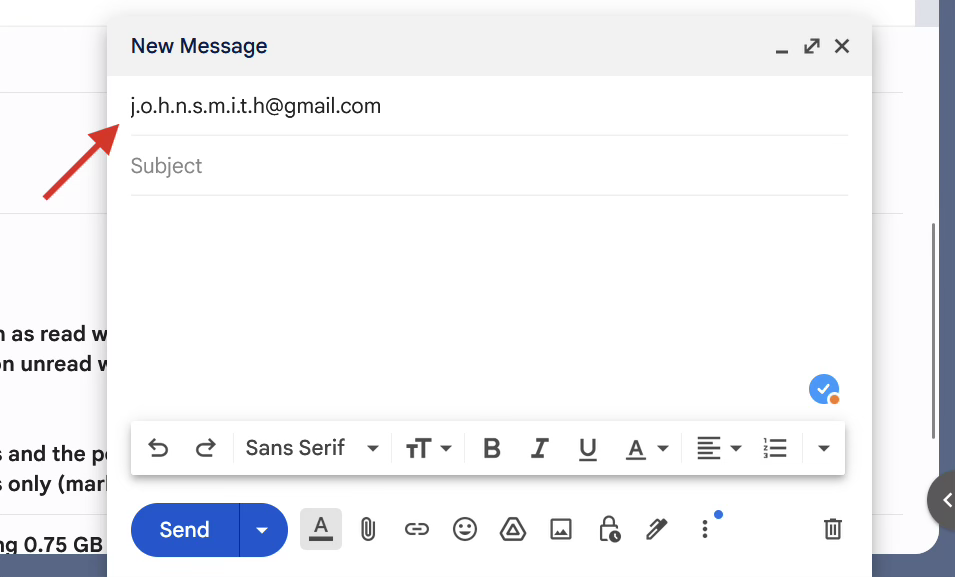
    Gmail doesn’t recognize dots in the username part of your email. What that means is:

    • johnsmith@gmail.com
    • john.smith@gmail.com
    • and even j.o.h.n.s.m.i.t.h@gmail.com 

    All go to the same inbox.

    So technically, you can hand out multiple “versions” of your Gmail address just by adding dots wherever you want. It’s perfect for filtering or tracking where your emails come from. You simply create multiple accounts, and each of them will bring the mail from a specific type of content. An example would be to use one for courses, another one for subscriptions, etc.

    2. Gmail plus addressing (a.k.a. the “+ trick”)

    Now we’re getting clever. This method lets you create Gmail aliases on the fly, without having to register anything new.

    Here’s how it works:

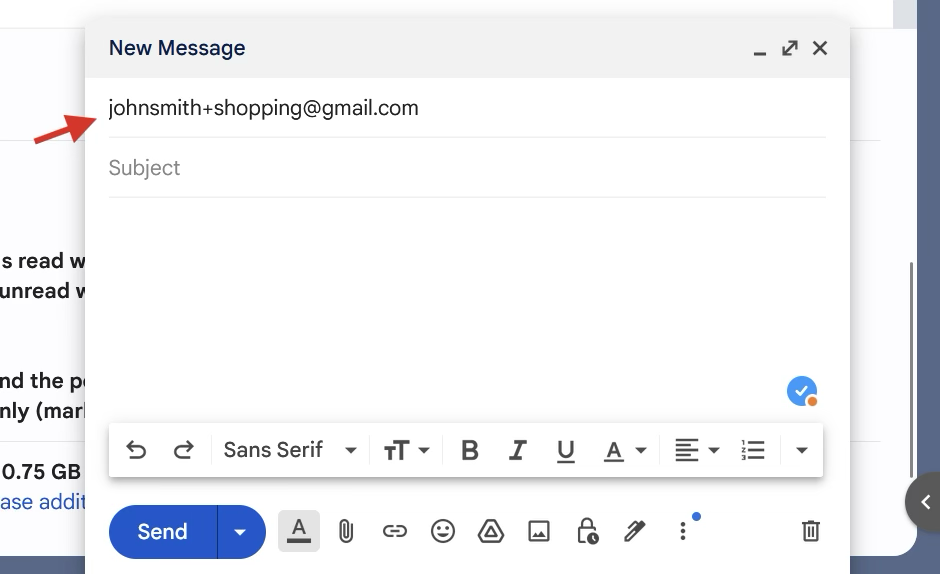
    You just add a plus sign (+) and a word of your choice after your username but before @gmail.com.

    Example:

    If your email is johnsmith@gmail.com, you can use:

    • johnsmith+shopping@gmail.com 
    • johnsmith+work@gmail.com 
    • johnsmith+newsletters@gmail.com 

    All of those are treated as aliases and still land in your main inbox. This technique is often called Gmail plus addressing, and it’s ideal for organizing incoming messages using filters or labels. It is very useful to separate things, while keeping the inbox structured with said system.

    Pro tip: you can set up automatic filters in Gmail so that, for example, anything sent to +shopping skips your inbox and goes straight to a “Shopping” label. That way, if it comes from that address, you know it’s related to that topic at a glance.

    3. Use Gmail’s “Send mail as” feature

    This one’s for those who want to take it a step further. Let’s say that you want to send emails from your Gmail alias, not just receive them. Yes, Gmail allows you do that, too!

    How to set it up (it’s rather easy):

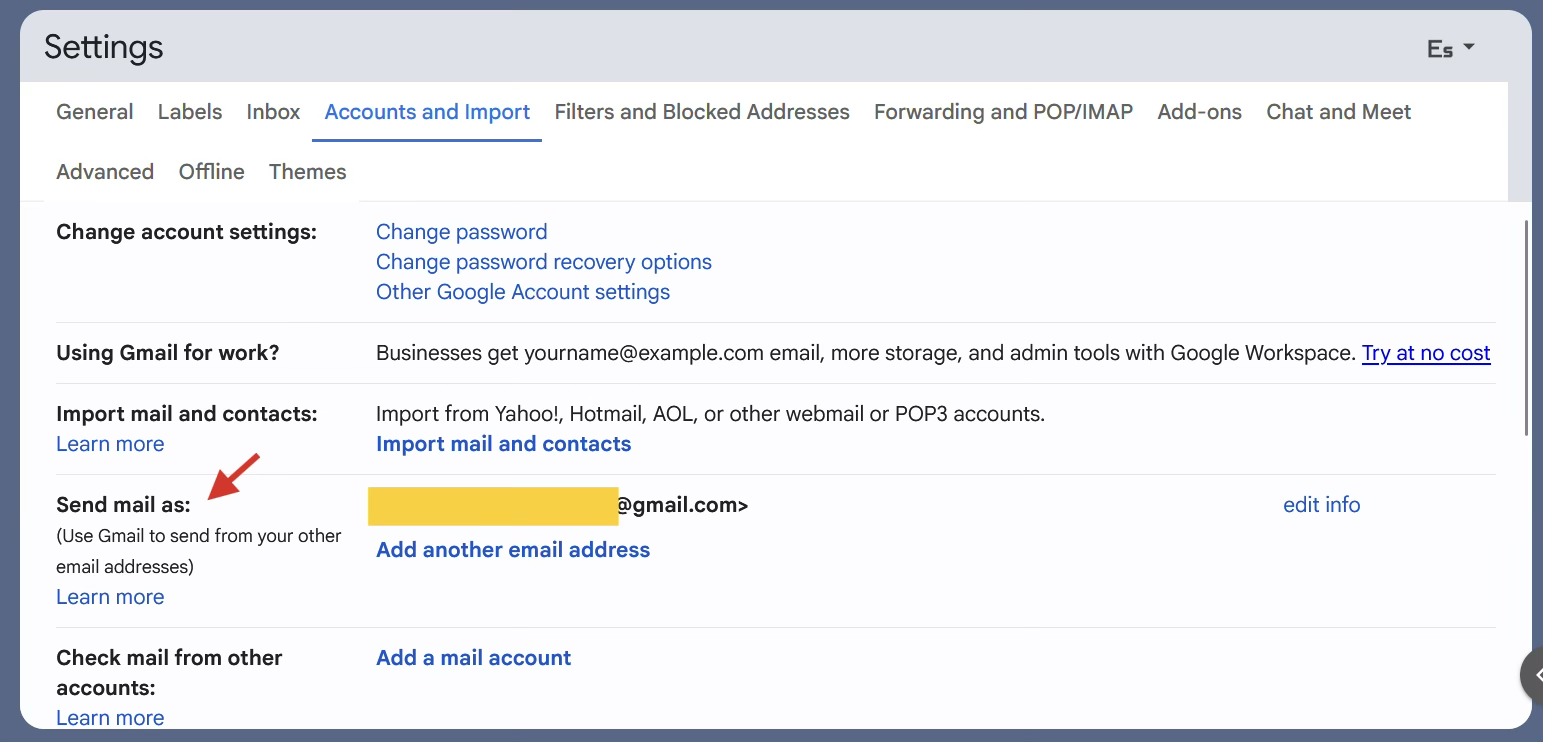
    1. Open Gmail and hit the little gear icon up top.
    2. Click “See all settings”.
    3. Jump over to the “Accounts and Import” tab.
    4. Scroll to the “Send mail as” section and click “Add another email address”.
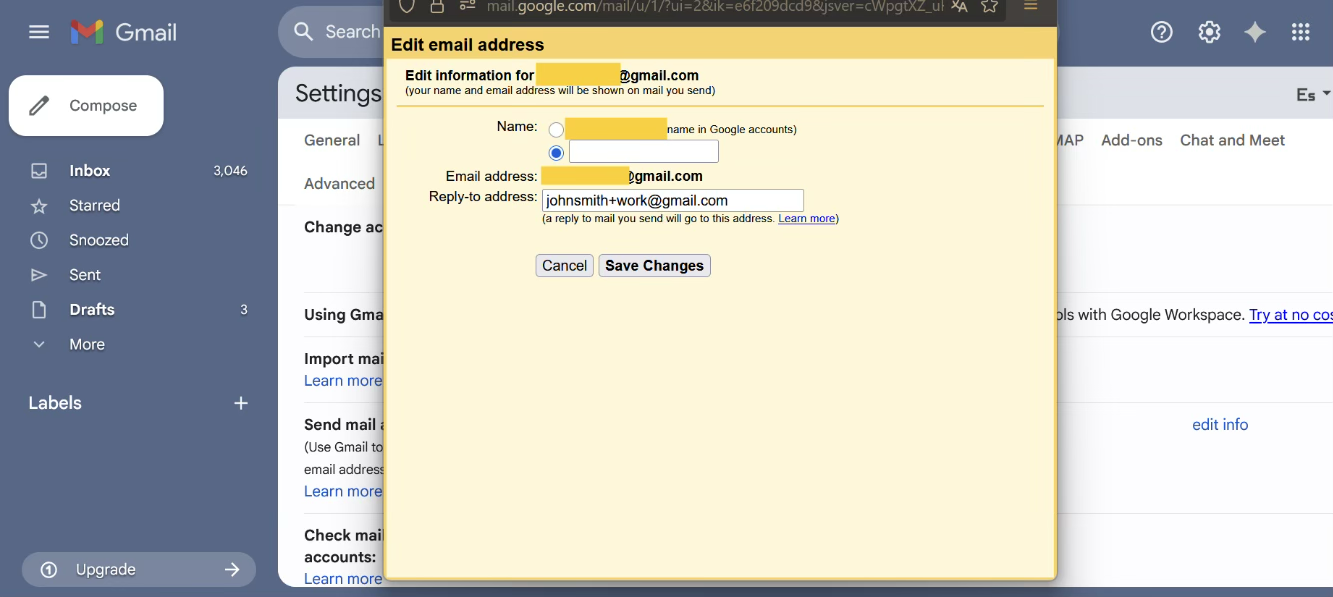
    5. Type in your Gmail alias (something like johnsmith+work@gmail.com) then hit Next Step.
    6. Leave the SMTP alone and confirm.

    And, to sum things up, here are the three easiest ways to create Gmail aliases without leaving your inbox:

    1. First, use dots to create subtle variations of your Gmail address (Gmail ignores them anyway, don’t worry).
    2. Use the Gmail plus addressing method to generate custom aliases for filtering and organization.
    3. Use Gmail’s “Send mail as” setting to send emails from any of those aliases, like a pro.

    No complicated steps, no browser extensions, and definitely no need to mess with your domain settings. Just a few clicks and you’re done.

    Gmail Alias vs Alias Email & Other Services: Full Comparison Table

    These days, there are a bunch of ways to handle multiple email identities, but they’re definitely not all the same. Some give you more privacy, others are just easier to use.

    If you’re thinking about using an email alias, it’s honestly worth poking around a bit before picking one. Not all tools work the same way, and what’s perfect for someone else might be way too much (or not enough) for what you actually need.


    Frequently Asked Questions

    How do I add an alias to my Gmail account?

    The quickest way is the plus (+) trick: add +something to your address — for example yourname+shopping@gmail.com — and Gmail delivers it straight to your inbox with zero setup. For real privacy, add a dedicated email alias instead, which forwards to Gmail while keeping your actual address hidden.

    Can you have multiple aliases in one Gmail account?

    Yes. The + trick gives you unlimited on-the-fly variations of your address, so you can use a different one for every signup. The catch: they all contain your real username, so any sender can strip the tag back to your main address.

    Do Gmail aliases hide your real email address?

    No. Plus-tags and dotted variations still expose your real Gmail address, so they don’t truly protect your identity. To actually hide it, use a forwarding alias from Alias Email — you get 10 aliases free, and your real inbox stays private.

    Is a Gmail alias the same as a burner email?

    Not exactly. A burner email is disposable and meant to be thrown away, while a Gmail + alias is tied to your account for the long term. If you just need a throwaway address for one signup, a burner is simpler; for ongoing organization, an alias wins.

    Can I use a Gmail alias with my own domain?

    Not with the plain + trick. To send and receive from an alias on your own domain, you need a dedicated service — see our guide to custom-domain email aliases for the full setup.

    Create alias in seconds

    Start protecting your inbox now — it’s free!

    Create my first alias

    To make things easier, here’s a quick side-by-side of how Gmail’s built-in alias stuff stacks up against a few other popular options. Just so you’ve got a better idea of what’s out the

    ToolFeaturesPricingPrivacy levelEase of useLimitations
    Gmail AliasDot trick, plus addressing, send-asFreeLow (linked to Gmail)Very easyNo real anonymity, basic filtering only
    Alias EmailFull dashboard, custom domains, repliesPaid (free tier)HighEasyLimited features on free plan
    SimpleLoginUnlimited aliases, PGP, browser extensionsFree & paidVery highModerateSetup can be a bit complex at first
    Addy.ioLightweight, supports reply & sendFree & paidHighEasyFree version has limits
    DuckDuckGo Email ProtectionEmail masking, tracker blockingFreeHighVery easyNo full inbox, can’t send as alias
    Burner MailOne-click aliases, reply supportPaid (free trial)HighEasyLimited alias storage on free plan
    Firefox RelayBasic alias masking, browser integrationFree & paidHighEasyNo full send/receive flexibility

    When Should You Use a Dedicated Email Alias Service Instead?

    The truth is that Gmail aliases are great when you need something quick and simple, especially for sorting messages and such. But let’s be honest, they do have their limits.

    If you’re looking for more control, stronger privacy, or features like replying anonymously, then a more robust email alias service might be your treat.

    This is where Gmail’s built-in stuff starts to kind of fall apart:

    • You want real anonymity: at the end of the day, every alias still connects to your main account. So, if you’re trying to stay off the radar? Yeah… not ideal.
    • You’re trying to reply without showing your real email: sure, you can receive stuff with the plus-address trick. But once you hit reply? Your real address is right there.
    • You’ve got a bunch of aliases to juggle: Gmail’s just not made for that. Things get messy fast, and forget about advanced filtering, it’s pretty limited.

    Gmail Alias Limitations and Privacy Concerns You Should Know

    Gmail aliases are pretty handy for keeping your inbox in check, that’s a fact, but let’s not pretend they’re perfect… as they’re not. Because if privacy’s something you actually should care about, there are a few things you’ll want to keep in mind before leaning on them too hard.

    Here’s the lowdown:

    • They’re not really anonymous: even if you toss in some dots or use that plus trick, it’s still the same email under the hood. Anyone paying attention can tell it’s you.
    • They’re all linked to your main Google account: so yeah, if something happens to that account, like, worst case, it gets hacked, every alias goes down with it. No separate safety net there.

    Now, look, we’re not saying Gmail aliases are bad. Far from it. 

    They’re actually pretty useful for day-to-day stuff. But if you’re using them to stay private or keep your identity on the down low? Just know they’ve got limits. And it’s better to be clear on that upfront than find out the hard way.

    Why Alias Email is the Smarter Choice for Professionals

    If you’re handling sensitive stuff, bouncing between different clients, or just want to have a bit more control over your digital life, Gmail’s built-in tools don’t cut it.

    Gmail aliases can help you keep your inbox from turning into a mess, but let’s be honest, they’re not some magical solution.

    If you actually care about privacy (like, really care), there are a few things you should probably know before you start relying on them too much.

    For that, here’s the lowdown:

    • You want to reply without exposing your real inbox
    • And need multiple aliases tied to a custom domain
    • You care about tracker blocking and smarter filters
    • Or you’re simply tired of the limitations that come with the usual email alias tricks

    In short, if you freelance, run your own gig, or just want to stop stressing about your info floating around, upgrading your email setup isn’t a bad move.

    Gmail works, sure. But when you’ve got clients, logins, random forms, and God-knows-what else hitting your inbox… having something a bit more solid? Game-changer.

    You don’t need to overthink it. Just makes life easier. That’s it.

    Get started with secure email aliases now, and try Alias Email for free today!

  • Temp Mail vs. Email Alias: Which One Should You Use in 2025?

    Temp Mail vs. Email Alias: Which One Should You Use in 2025?

    Ever signed up for a website and instantly regretted giving your real address? That’s exactly where a temporary email saves the day! 

    With spam piling up and privacy risks around every corner, more people are turning to smarter ways to protect their inbox. And so should you.

    Two of the most popular tools today are temp mail and email aliases. Well, both of them can help you stay anonymous and cut down on unwanted emails. However, the thing is that they work in different ways. For example, temp mail is quick, while an alias lets you mask your real address

    Picking the right tool seriously levels up your spam protection and online safety. So, which mail should you go with in 2025?


    Table of Contents

    1. What Is Temp Mail and How Does It Work?
    2. What Is an Email Alias and How Does It Work?
    3. Key Differences Between Temp Mail and Email Alias
    4. When to Use Temp Mail
    5. When to Use an Email Alias
    6. Pros and Cons of Temp Mail and Email Alias
    7. Which One Should You Choose?
    8. FAQs – Temp Mail vs Email Alias
    9. Conclusion

    What Is Temp Mail and How Does It Work?

    A temp mail (also called a temporary email) is basically a quick, throwaway inbox you can use when you don’t feel like sharing your real one. This is simply perfect for staying anonymous and avoiding that annoying spam.

    Let’s be honest… nobody enjoys giving out their personal email into some site that you simply don’t trust. That’s where temp mail shines. No matter if you’re grabbing a freebie or just trying to avoid a flood of newsletters. A temp email keeps your inbox safer from spam. 

    But the best part, without a doubt, is that it’s ridiculously easy to use. Just head over to a temporary email service, and in a matter of seconds, you’ve got a random email address ready to go. This email doesn’t need a sign-up, no passwords either. You just copy it, and that’s it. The messages will come up instantly, and after a bit, the inbox disappears on its own. Use and forget. Free and without spam.

    What Is an Email Alias and How Does It Work?

    Now that we’ve covered temp mail, let’s talk about the other big player in email privacy: the email alias.

    For starters, an email alias is a secondary address that forwards messages to your real inbox. You can think of it as a mask, since it lets you hide your email address without creating an entirely new account. To put it simply, you’re still receiving everything in your main inbox, but your actual address stays private.

    So, what’s the difference between an alias and a full inbox? 

    Simple. A real inbox stores emails and can be used to send and receive messages directly. An alias, on the other hand, just forwards stuff, it doesn’t have its own storage or login. It’s more of a redirect than an actual separate account.

    Plenty of services let you set this up with just a few clicks. For example, Gmail allows you to add dots or plus signs to your address to sort incoming messages. And that’s quite useful.

    Related Article

    Key Differences Between Temp Mail and Email Alias

    So, now that we’ve seen what each tool does on its own, let’s stack them side by side. When it comes to temp mail vs email alias, both have their perks, but they’re built for totally different situations.

    Now, here’s a quick breakdown to help you see how they are different:

    FeatureTemp MailEmail Alias
    DurationIt’s temporary (just lasts minutes to hours)Permanent (until you delete it)
    SecurityLow (public inbox)High (protected by your provider)
    Use caseOne-time signupsOngoing filtering and organization
    Access methodPublic, browser-basedPrivate, goes straight to your real inbox
    TraceabilityFully anonymousLinked to your main email address

    When to Use Temp Mail

    There are moments online when giving out your real email just doesn’t feel right, and honestly, you’re probably wise to avoid doing so. That’s exactly when temp mail comes in handy. It helps when all you need to get something that simply works, but without signing up for a lifetime of spam.

    Ideal for one-time registrations

    Picture this: you’re trying to grab a free e-book or testing out a tool that forces you to give an email just to see the results. 

    You know the deal: once you enter your address, it’s game over for your inbox

    Instead of sacrificing your real email, a temporary email gives you a quick way in and out. Sign up, get what you need, and disappear. No commitment, no consequences. Zero spam involved.

    The same goes for dodgy-looking sites. If it gives you even the slightest weird vibe, don’t risk it. Just drop in a burner email and move on with your day.

    Avoid giving personal data or risking spam

    Nobody wants to be buried under a mountain of newsletters or shady promo emails. Using temp mail is one of the easiest ways to keep your personal data safe and your inbox squeaky clean. It’s like putting up a spam-proof shield every time you browse something new or suspicious.

    For that, if you’re constantly trying out new platforms, tools, or services, temp mail is a lifesaver. No need to deal with endless unsubscribe emails, just use it and forget it.

    That said, it’s not magic. A disposable email isn’t built for long-term use. If you think you’ll need to log in again, recover a password, or receive updates later on, temp mail’s not the move. 

    Once the inbox expires, it’s gone for good. So, if you care about the account, better stick with something more permanent.

    Create alias in seconds

    Start protecting your inbox now — it’s free!

    Create my first alias

    When to Use an Email Alias

    If temp mail is the quick band-aid, an email alias is your well-thought-out plan. It’s ideal for anyone who wants to hide their email address without losing control of their inbox. 

    Basically, it gives you the perks of multiple emails, without the headache of actually managing a bunch of accounts.

    For newsletters, shopping, work segmentation, filtering

    These days we all sign up for way too much. Newsletters, promo codes, job alerts, online shopping accounts… and suddenly your inbox is a spam war zone. 

    This is where aliases help. You can create one for shopping, another for work-related stuff, and maybe one just for subscription emails. Everything still lands in your main inbox, but it’s way easier to filter, sort, and stay sane.

    More long-term control without exposing main inbox

    One of the best things about using aliases is the control they give you. You’re not just throwing an email into the void and hoping for the best. 

    If an alias starts getting spammy, or you’re done using it, just deactivate it. No need to change your real address or go through messy unsubscribe hell. It’s a super simple way to secure your email while keeping things neat and tidy.

    Useful for professionals and online shoppers

    No matter if you’re looking for work or just love a good sale, aliases are quite helpful. They allow you to organize your online life like a pro, without ever exposing your actual inbox to every random form on the Internet.

    So if you’re looking for a low-effort, high-payoff way to stay private and stay organized, an email alias is the way to go.

    Pros and Cons of Temp Mail and Email Alias

    By now, it’s pretty clear that both temp mail and email aliases are awesome for keeping your email private, but they’re made for different stuff. So, what’s each one good at, and where do they kind of miss the mark?

    Temp Mail Pros

    • Quick to use: you get an address instantly, no forms, no passwords, no fuss. It’s perfect when you just want to get in and out.
    • Fully anonymous: your real identity stays hidden. You don’t even need to type your name.
    • Zero setup: you don’t need to sign up or configure anything. Just open the site, grab the address, and go.

    Temp Mail Cons

    • Public inbox: anyone who has the same temp mail address can read what lands in that inbox. Not great for sensitive stuff.
    • Weak on security: since the inbox is open and short-lived, you can’t rely on it for anything private or important.
    • Short shelf life: once it expires, it’s gone for good.

    Email Alias Pros

    • Easy to manage: with an alias email, you can create as many aliases as you need, add filters, and just turn them off when you’re done. Super flexible.
    • Built for the long haul: this email is perfect if you need an email that sticks around for a bit, weeks, months, even longer, without using your real one.
    • Built for the long haul: it’s ideal if you need an email that sticks around for a while.

    Email Alias Cons

    • Still tied to your main account: even though the alias masks your real address, it still routes through your provider. So, it’s not totally off the radar.
    • Needs a bit of setup: depending on the platform, setting up and organizing aliases might take a few extra steps. Nothing too crazy, but it’s not instant either.

    Which One Should You Choose?

    At the end of the day, temp mail vs alias isn’t a one-size-fits-all thing. It really comes down to how you surf the Internet and how much you care about keeping your inbox from turning into a mess.

    If privacy’s something you actually care about, the smartest move is to use both. That way, you’re covered no matter what.

    Temp mail is quick and disposable, keeping shady platforms at bay. 

    Meanwhile, an email alias is great for stuff you want to keep tabs on, like subscriptions, newsletters, or accounts you actually care about. But, by using both gives you solid protection without the headache.

    Now, if you’re more of a casual user, you do a bit of online shopping, sign up for the occasional newsletter, maybe register for a webinar here and there, aliases are your best bet. That’s because they’re easy to set up, you don’t need any extra tools, and they keep your real inbox from turning into a junkyard.

    On the flip side, if you’re always testing out new tools or services “just to see,” you’re what we’d call a tester. And for you, temporary email is the way to go. It’s fast, anonymous, and there’s zero commitment.

    The bottom line?

    • If it feels sketchy, go with temp mail.
    • If it’s something long-term, stick with an alias.

    FAQs – Temp Mail vs Email Alias

    Is temp mail really anonymous?

    Mostly, yes. Temporary email services don’t ask for personal info, so there’s no direct link to you. Just remember the inbox is public, others could see the messages if they have the same address.

    Can I use an email alias to reply?

    Yep! The usual services such as Gmail, ProtonMail, and iCloud let you reply using your email alias, so your real address stays hidden.

    What happens if I use temp mail for a login?

    It works short-term, but once the disposable email expires, you’ll lose access to password resets or updates. Not great for important accounts.

    Is it safe to use temp mail for banking?

    Definitely not. Temp mail isn’t secure enough for personal or financial stuff. Use your main or secure email instead.

    Conclusion

    Well, if you came down here, you’ll know that both temp mail and email aliases have their uses. While temp mail’s awesome for those “meh, don’t fully trust this site” kind of moments, aliases are solid when you want to keep things organized for the long haul.

    No need to overthink it… just go with whatever makes sense at the time. Sometimes you need something quick and disposable, other times you want more control and peace of mind.

    The decision comes down to whether you want to stay safer online or not. If the answer is a resounding yes, start by locking down your inbox. It’s a small step, but it goes a long way! If you are ready to secure your inbox, start with Temp Mail for free and take the first step towards better email privacy.

  • Bump is now Alias Email

    Bump is now Alias Email

    This is a big milestone for us — we are now Alias Email instead of Bump.
    A new name, a fresh design, and a clear vision.

    Why did we change our name?

    “Bump” was too common and didn’t fully reflect our purpose.
    We want to focus on email aliases – continuously improving and becoming the best service in this space.

    Have our features changed?

    No, all existing functionality has been fully transferred.
    We’ve also rethought and refined everything to enhance your user experience.

    What’s next?

    We value transparency and want to share more about our service and how it protects your privacy.
    Your security and trust are our top priorities.

    We also have exciting improvements and new features in the works – stay tuned!

    Best regards,
    Alias Email Team